
Reports Builder
Report Builder generates all the detailed and summarized reports by extension, cost center, trunks, etc.
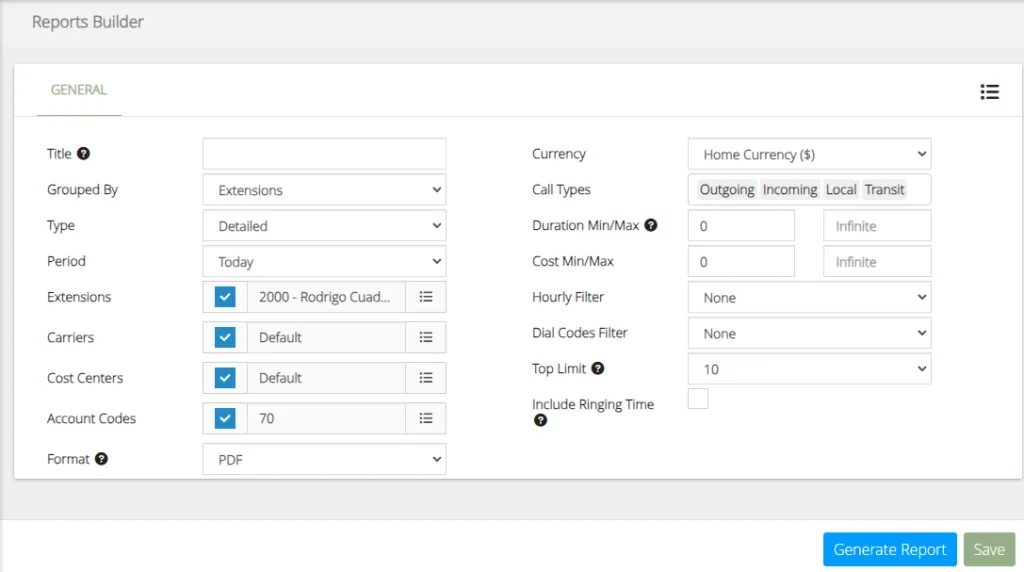
The data to be configured are the following:
-
Title, this represents the title of the report, is required only when the report is saved as template.
-
Group By, generate the report by grouping it by the selected option.
-
Type, generate the report with the selected option.
-
Period, range of date and time to be taken into account in the report.
-
Extensions, extensions to be included in the report, if the check is selected, all extensions will be included.
-
Carriers, carriers to be included in the report, if the check is selected, all carriers will be included.
-
Cost Center, cost center to be included in the report, if the check is selected, all cost centers will be included.
-
Account Codes, account codes to be included in the report, if the check is selected, all account codes will be included.
-
Format, defines the format in which the report will be exported.
-
Currency, currency to show report.
-
Call Types, types of calls to be included in the report.
-
Duration Min/Max, duration Min/Max expressed in seconds
-
Cost Min/Max, cost Min/Max expressed in home currency
-
Hourly Filter, hour filter to use to generate the report. This filter must have been previously created.
-
Dial Codes Filter, dial codes filter used to generate the report. This filter must have been previously created.
-
Top Limit, limit the number of items to show in top reports.
You can create a profile for later use in Report Schedule, configure the information and press the “Save” button.
Was this article helpful?
Your feedback helps us improve the documentation.
Thank you for helping us improve!