
Users
In users create and configure the following options.
-
User, user creation and modification.
-
Agent Profile, creation of causes of breaks for Users (Agents).
-
Roles, creation of User permissions.
-
System Permissions, creation of access to Agents, Campaigns and Queue. In order for a User not to be able to see other campaigns to which he/she is allowed to access.
In order to access the system, it is necessary to create users, there are two types of users:
-
Admin, is for system administrators, it is not associated with any extension.
-
Agent, is for Agents, it has to be associated to a device (Extension).
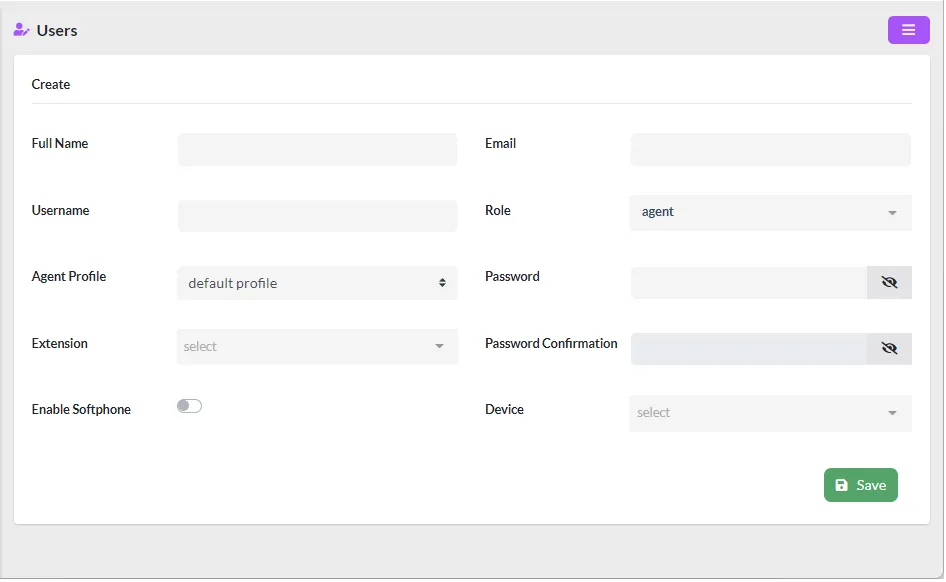
he data to consider when creating a user are as follows:
-
Full Name, full name to identify the User.
-
Username, short name to log in to the system.
-
Agent Profile, type of pause profile if the user is an Agent.
-
Extension, extension associated to the user. Necessary when dealing with an Agent.
-
Enable Softphone, it is possible to have a WebRTC softphone integrated in the same Agent interface. When this option is enabled, it will appear. Please note that for this softphone to work you must have a VitXi license.
-
Email, e-mail associated with the user.
-
Role, by selecting “agent” this user becomes an Agent, any other role you choose is administrative.
-
Password, password to login.
-
Password Confirmation, confirmation of password to enter.
-
Device, device to be associated with the Agent. It must be previously created in VitalPBX.
Was this article helpful?
Your feedback helps us improve the documentation.
Thank you for helping us improve!