
By Queue
On the reports by Queue, we can get a summary of all the activity in each queue with the following information:
-
Queue, Call Queue.
-
Answered Calls, total number of calls answered by the agents.
-
Abandoned Calls, total number of calls not tended by the agents and left the Queue.
-
Offered Calls, total number of calls that entered the Queue.
-
Max Callers, maximum position of a caller waiting in Queue, lower is better.
-
Answered %, percentage of answered calls with respect to the calls that entered Queue.
-
Abandoned %, percentage of calls not tended to with respect to the calls that entered Queue.
-
Avg Calls Length, average duration of answered calls.
-
Total Calls Length, total duration of answered calls.
-
Avg Calls Wainting Time, average wait time.
-
Total Waiting Time, sum of all wait times in a Queue.
-
Service Level, Service Level with respect to the value entered when creating the Queue in VitalPBX.
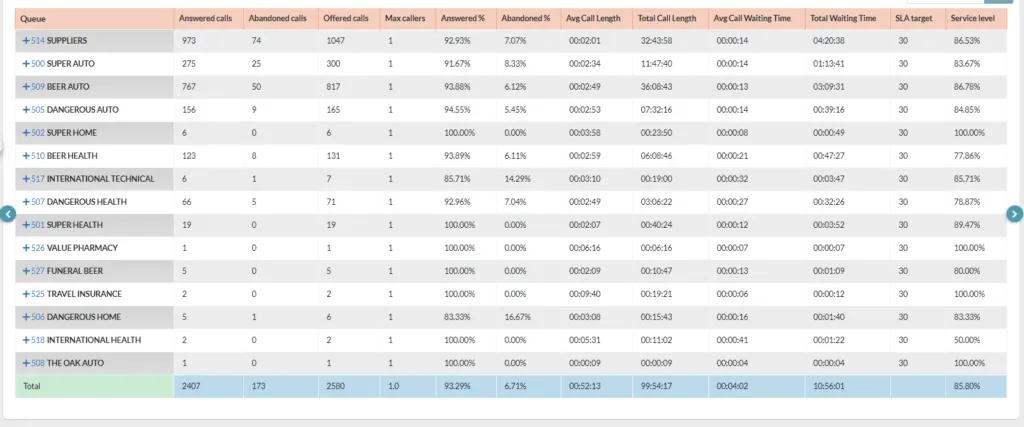
It is possible to see a call detail of the calls in each queue, by pressing the plus (+) symbol in front of the queue number.

Was this article helpful?
Your feedback helps us improve the documentation.
Thank you for helping us improve!