
Extensions Summary
Shows a list of the extensions selected when creating the Widget. Details are shown below:
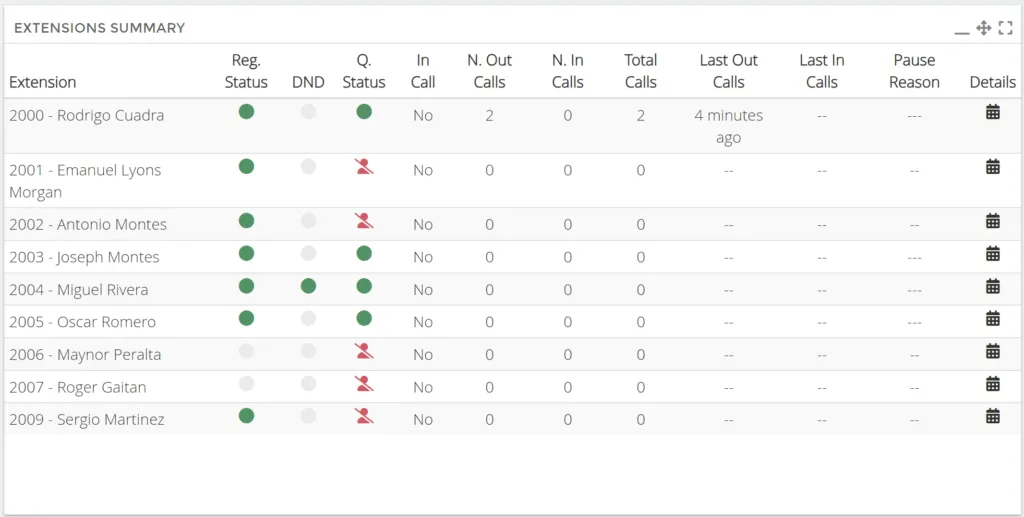
Below we will describe each of the columns displayed in the Widget.
-
Extensions, Extension Number and Name.
-
Reg Status, Green → Registered, Red → Not registered.
-
DND, Green → The extension is not available. Gray → The extension is available.
-
Q. Status, Green → The extension is registered in the queue. Red → the extension is not registered in any queue, Red Man with line → The extension does not belong to any queue.
-
In Call, Yes → the extension is on a call. No → the extension is free.
-
N. Out Calls, Number of outgoing calls on the current day.
-
N. In Calls, Number of incoming calls on the current day.
-
Total Calls, Number of outgoing and incoming calls on the current day.
-
Last Out Call, Shows how long ago the last outgoing call of the current day was from the extension.
-
Last In Call, Shows how long ago the last incoming call was for the current day from the extension.
-
Pause Reason, Shows the reason for the extension’s last pause.
-
Details, Shows details of incoming, outgoing and internal calls of the extension.
Was this article helpful?
Your feedback helps us improve the documentation.
Thank you for helping us improve!