
My Contacts Layout
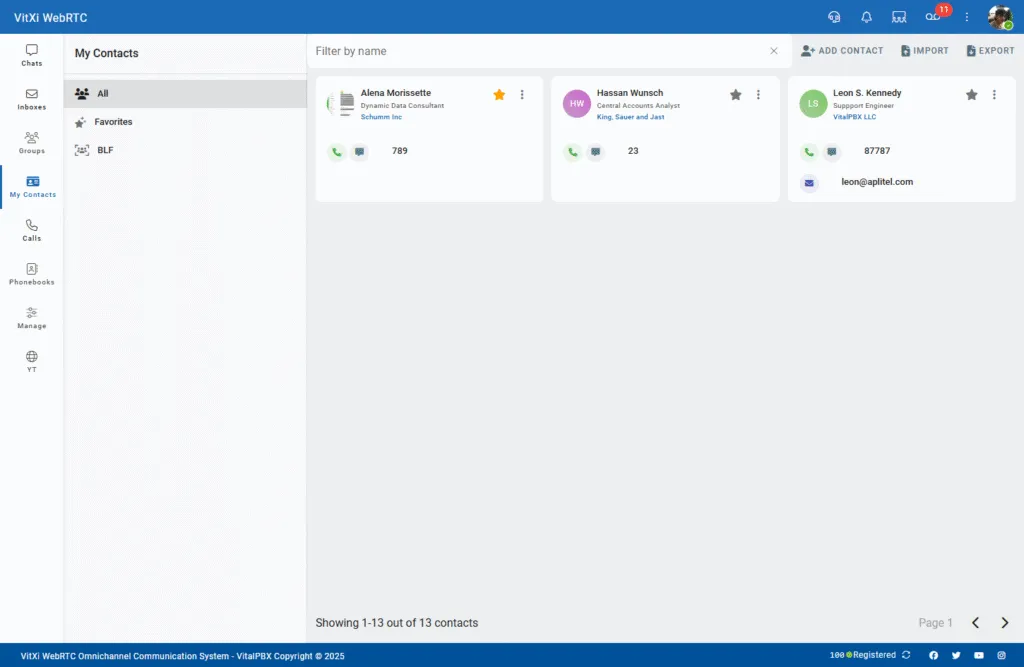
The My Contacts module in VitXi WebRTC allows users to manage personal and organizational contacts in one place.
From here, users can quickly initiate calls, send messages, or organize frequently used contacts as favorites.
Interface Overview
Section titled “Interface Overview”The layout is divided into two main sections:
-
Contact Categories Panel (left sidebar)
-
Contact Grid Area (main view)
Contact Categories Panel
Section titled “Contact Categories Panel”The sidebar allows users to switch between different contact categories:
-
All — Displays all saved contacts.
-
Favorites — Shows only contacts marked as favorites ⭐.
-
BLF — Displays BLF (Busy Lamp Field) contacts if configured for the user.
This panel helps users organize and access contacts more efficiently.
Contact Grid Area
Section titled “Contact Grid Area”The main area displays contact cards with key information and quick actions.
Each Contact Card Includes:
Section titled “Each Contact Card Includes:”-
Avatar or Initials — Represents the contact visually.
-
Full Name and Job Title.
-
Company Name (if provided).
-
Phone Extension or Number.
-
Email Address (optional).
-
Favorite Icon ⭐ — Click to mark or unmark a contact as favorite.
-
Action Buttons:
-
Call – Initiates a direct VoIP call.
-
Chat – Opens a conversation with the contact.
-
Toolbar Options
Section titled “Toolbar Options”At the top-right of the view, users have the following options:
-
Add Contact — Create a new contact manually by entering name, number, and other details.
-
Import — Upload a contact list (from a CSV).
-
Export — Download your current contact list for backup or migration.
Additionally, a search bar at the top allows users to filter contacts by name instantly.
Was this article helpful?
Your feedback helps us improve the documentation.
Thank you for helping us improve!