
Advanced Extension Settings
Extensions have additional parameters you can configure to manage them more granularly. These options are available under PBX > Extensions > Extensions, and click on Advanced.
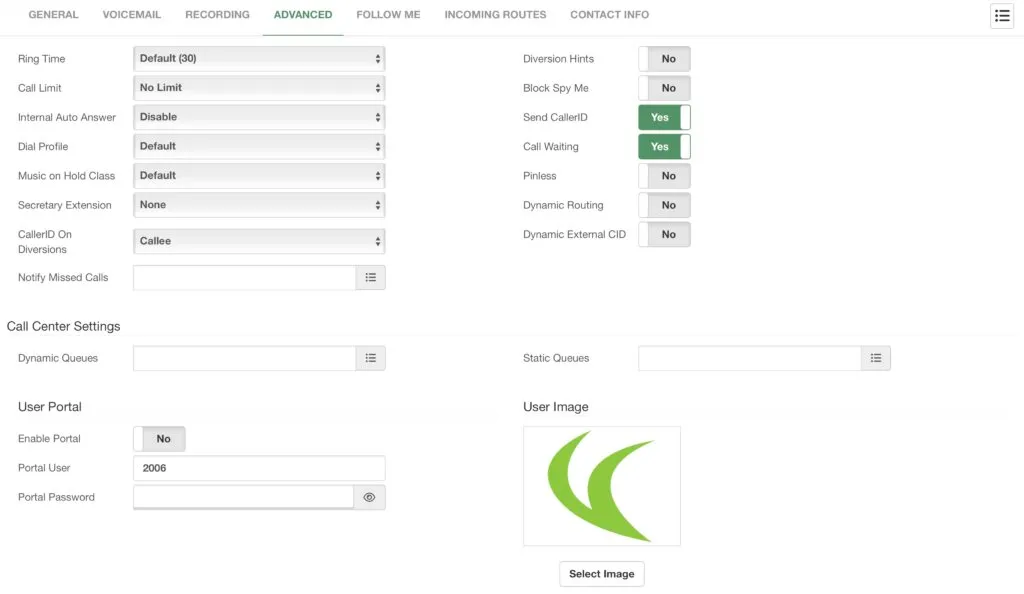
In this section, you can modify the following options.
-
Change the Ring Time, so you can select how long the extension rings before going to voicemail or hanging up.
-
Change the Call Limit of the extension’s number of calls at once.
-
Do an Internal Auto Answer to answer internal calls in the speaker automatically.
-
Change the Dial Profile for transfer and ringback properties.
-
Change the Music on Hold Class that plays when the user places a call on hold.
-
Assign the Secretary Extension. We will see more about this feature later.
-
You can also select the Caller ID sent on Diversions. This allows you to choose whether you send the caller’s CID or the extension number when you have a call forward active.
-
Notify Missed Calls using the Missed Calls email template. You can choose to send External, Internal, Queue, and/or Ring Group calls.
-
Enable Diversion Hints if you need to monitor the diversion status from another extension. This comes set to No by default, as it adds a load to the system.
-
You can Block Spy Me if you don’t want anyone to use the Spy feature with this extension. This is useful for administrative extensions in a Call Center environment.
-
Enable or Disable Send Caller ID if you wish to keep your extension anonymous within the company.
-
Enable or Disable Call Waiting if you want to send an incoming call while the extension is busy to voicemail or hangup.
-
Pinless will allow you to use various features with a PIN without entering any PIN.
-
The Dynamic Routing feature allows you to automatically route calls with callers you were conversing with. For example, if you are on a call with a client and the call ends, the next time the caller calls, they will be routed back to the extension instead of going to a predefined destination, like an IVR or an operator.
-
You can enable or disable a Dynamic External ID. This is useful when you use the extension as a trunk from a third-party system—using the incoming call’s CID as the Caller ID.
-
Lastly, you can Call Back on Busy Transfer. This allows you to have a call transferred back to this extension if the destination extension is busy during a blind transfer.
Next, you have Call Center Settings. This allows you to easily add the extension to multiple queues as a Dynamic or Static agent.
Finally, there’s the User Portal section. Here you can define a username, password, and profile picture so the user can access the User Portal and manage their extension options. We will be taking a look into this User Portal later. You can enable and disable this feature at any time.
Was this article helpful?
Your feedback helps us improve the documentation.
Thank you for helping us improve!