
Menu
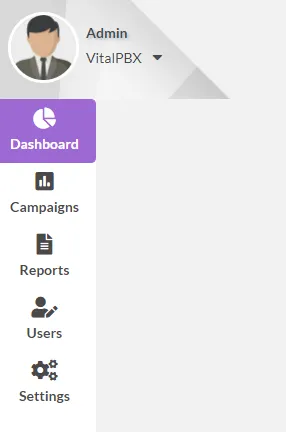
In the menu we have the following options:
-
Dashboard, here we will be able to see the campaigns and active agents, as well as contacts attended, etc.
-
Campaigns, here the campaigns are completely configured, this menu has the following options:
-
Campaigns, although it is the last option to configure, it is where the campaign is assembled with all the previously configured data.
-
Contact Lists, here we load the list of contacts to be used in the campaign, it allows CSV, XLS or XLSX formats.
-
Disposition Groups, the layout groups are configured, i.e. the result to be selected by the agent at the end of the call.
-
Form, the form to be used in each campaign is created. This form is to fill out additional information related to each call.
-
Queues, in order to keep statistics and to be able to assign agents to each company, it is necessary to create call queues, these queues are associated to the agents.
-
Reports, Reports by Agent, Dispositions and Call by Agent.
-
Agents Report, it is possible to generate reports on the activity of each agent within a campaign.
-
Dispositions, it is possible to see the overall result of each campaign by layout.
-
Call By Agent, shows the details of each Agent’s calls.
-
-
Users, here we create the system users with their respective privileges.
-
Users, create the users and associate them to the Role and Agent Profile, as well as to an extension.
-
Pause Profiles, we create the pause causes which we are going to relate to the user.
-
Roles, we create the role that gives us access to each module of the App.
-
System Permissions, we associate the Agents with queues and campaigns.
-
Was this article helpful?
Your feedback helps us improve the documentation.
Thank you for helping us improve!