
Call History
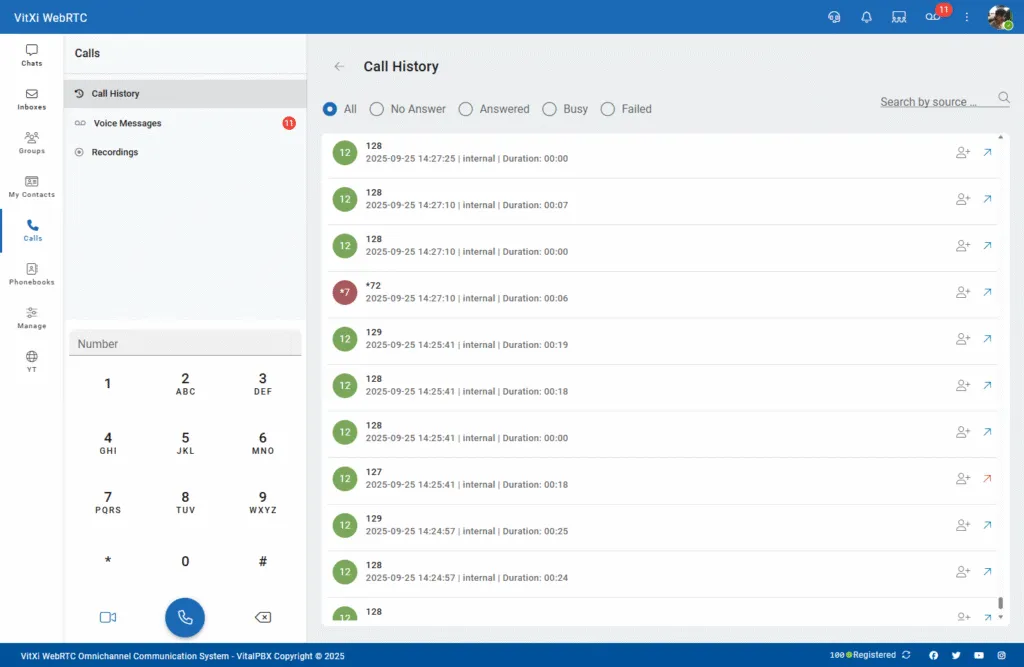
The Call History section in VitXi WebRTC provides users with a detailed view of all recent inbound and outbound calls.
It helps users monitor call activity, review duration, and quickly perform follow-up actions such as redialing or adding contacts.
Interface Overview
Section titled “Interface Overview”The Call History interface includes:
-
A filter bar to refine call results.
-
A list of recent calls showing detailed information per entry.
-
A dialpad for quickly placing new calls (on the left sidebar).
-
A search option to locate calls by source, number, or contact name.
Filter Bar
Section titled “Filter Bar”Located at the top of the history list, it allows users to filter calls by type:
-
All – Displays all calls.
-
No Answer – Missed calls not answered.
-
Answered – Successfully connected calls.
-
Busy – Calls that failed due to a busy line.
-
Failed – Calls that could not be completed due to network or registration errors.
You can also search by source (caller name, number, or extension) to narrow down specific results.
Call List Details
Section titled “Call List Details”Each entry in the call history shows the most relevant information about the call:
| Column | Description |
|---|---|
| Contact/Number | Displays the name or phone number of the other party. |
| Date & Time | Indicates when the call occurred. |
| Type | Shows if the call was internal or external. |
| Duration | Displays the total call duration in minutes and seconds. |
| Status Indicator | Visual icon indicating call type: Outgoing, Incoming, Missed/Failed. |
| Actions | Quick buttons for: Add Contact, Redial. |
Calls are listed in descending order (most recent at the top).
Dialpad Integration
Section titled “Dialpad Integration”On the left side of the screen, the dialpad allows you to:
- Enter a number or extension and click the call button to start a call.
Was this article helpful?
Your feedback helps us improve the documentation.
Thank you for helping us improve!