
WebRTC Profile Settings
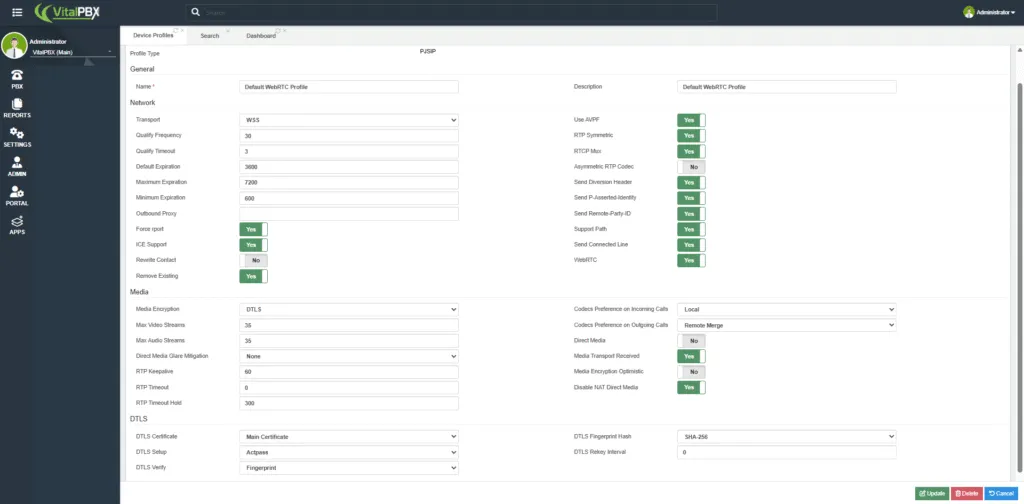
To ensure that VitXi WebRTC operates correctly, you must verify and configure the WebRTC Device Profile within VitalPBX. This profile controls the SIP, media, and WebRTC-specific parameters used by VitXi for audio and video.
Access the WebRTC Profile
Section titled “Access the WebRTC Profile”-
Log in to your VitalPBX Administration Panel.
-
Navigate to:
Settings → Technology Settings → Device Profiles -
Select the profile named “Default WebRTC Profile.”
Recommended Settings
Section titled “Recommended Settings”The recommended configuration ensures compatibility with WebRTC and secure media transport.
Use the following settings as shown in the image:
Save and Apply Changes
Section titled “Save and Apply Changes”After confirming that all parameters match the recommended configuration:
-
Click Update to save your changes.
-
Then click Apply Changes to reload the configuration.
If you do not apply the changes, the new WebRTC profile settings will not take effect.
Enable SRTP – RTP Encryption
Section titled “Enable SRTP – RTP Encryption”For additional call security, you may enable SRTP (Secure Real-Time Transport Protocol) encryption directly in the PJSIP Profile settings.
Go to Settings → Technology Settings → PJSIP Settings → PJSIP Profiles.
Locate your active PJSIP profile (usually “default webrtc” or “webrtc”).
Adjust the following options:
Setting Recommended Value Media Encryption DTLS Media Encryption Optimistic Yes This configuration ensures that all RTP media streams (audio and video) are securely encrypted, enhancing communication privacy between VitXi WebRTC and VitalPBX.
Was this article helpful?
Your feedback helps us improve the documentation.
Thank you for helping us improve!